
Beyond Automation: How Odoo’s Hidden AI Capabilities Drive Modern Business Efficiency
Beyond Automation: How Odoo’s Hidden AI Capabilities Drive Modern Business Efficiency

Running a business comes with a mountain of small, repetitive tasks. Whether it is typing out customer emails, sorting through piles of receipts, trying to guess which sales leads are actually going to buy, or figuring out how much stock to order for next month, these chores eat up hours of your day.
While most people think of artificial intelligence as just a chatting robot, Odoo packs smart capabilities deep into the background of its software. These features are designed to take the friction out of your daily routine. Best of all, you do not need to be a tech wizard to use them. They are built to be simple, approachable, and remarkably practical for everyday users.
Let’s look at how these lesser-known, powerful features work behind the scenes to make running a business easier, more efficient, and far less stressful.
1. Zero-Typing Vendor Bills: The Magic of AI OCR
Have you ever spent an entire afternoon manually typing numbers from paper receipts or PDF supplier invoices into your accounting system? One single typo in a decimal place or account number can throw off your whole balance sheet, leading to painful reconciliation hours later.
Odoo handles this challenge with automated Optical Character Recognition (OCR) backed by smart data extraction. When a vendor bill or invoice lands in your system via email upload or direct scan, the AI instantly reads the document. It automatically fills in the vendor name, invoice date, tax amounts, line items, and totals without you lifting a finger.
- Why it matters: It turns a tedious 5-minute data entry chore per document into a seamless 1-click review.
- The layman benefit: No more eye strain from squinting at tiny invoice numbers or stressing over manual data entry errors. Your accounts payable run like clockwork.
2. Predicting Who Will Actually Buy: Smart Lead Scoring
Your sales team likely gets dozens of new leads every week from website forms, social media inquiries, and phone calls. However, not all of those prospects are actually ready to purchase. Manually guessing which leads to call first is a recipe for missed opportunities and burned-out representatives.
Instead of relying on rigid, outdated rules (such as assigning arbitrary points just because someone clicked a link), Odoo’s AI looks at historical behavioral patterns. It analyzes past successful deals, company sizes, interaction histories, and engagement speeds to rank your incoming prospects automatically. It essentially tells your sales reps: “Call this person today—they match the exact profile and behavior of your best past customers.”
- Why it matters: Your sales team spends time actively closing deals instead of chasing dead ends or cold prospects.
- The layman benefit: Less guesswork for your staff and faster, more relevant responses for your most valuable potential customers.
3. Instant Email Drafts That Sound Like You
Writing professional follow-up emails, polite payment reminders, or detailed customer updates can grind your daily workflow to a halt. Staring at a blank blinking cursor trying to find the right polite wording is frustrating and time-consuming.
Odoo allows you to prompt the system with simple everyday phrases—such as, “write a polite follow-up for an overdue invoice” or “draft a thank-you note for a new product inquiry”—and instantly generates a polished, context-aware draft. It pulls data directly from the customer’s account records, meaning it already knows their name, what they bought, and when they interacted last.
- Why it matters: It accelerates external and internal communication while keeping your brand voice consistent and professional.
- The layman benefit: You save mental energy, reduce writing fatigue, and get your daily communication pipeline cleared out in a fraction of the time.
4. Automatic Helpdesk Triage and Quick Answers
When customers run into issues, they expect immediate, helpful answers. However, support teams frequently get overwhelmed trying to sort through a flooded inbox, prioritizing emergencies, and digging through old manuals to find the correct troubleshooting steps.
When a support ticket arrives, Odoo’s AI analyzes the customer’s message, detects their emotional tone and urgency level, and automatically categorizes or routes the ticket to the right department. Even better, it reviews your internal knowledge base and suggests the exact response or troubleshooting guide to the support agent instantly.
- Why it matters: Issues get resolved faster, operational bottlenecks disappear, and no support ticket ever falls through the cracks.
- The layman benefit: Happier customers who feel heard right away, without waiting hours for a human to manually read, sort, and reply to their support request.
5. Stock Forecasting: Knowing What to Order Before It Runs Out
Running out of popular products means losing sales, disappointing loyal customers, and handing business over to your competitors. On the flip side, keeping too much stock ties up your hard-earned working capital in a crowded warehouse.
Odoo uses intelligent demand forecasting to look at past sales cycles, seasonal spikes, lead times, and current fulfillment speeds. Instead of forcing you to manually calculate complex reorder points or guess next month’s demand, the system alerts you ahead of time with practical guidance: “Hey, based on how fast these items sell every November, you need to reorder next Tuesday to avoid a stockout.”
- Why it matters: You maintain a healthy, optimized inventory balance without guessing, hoarding cash, or risking empty shelves.
- The layman benefit: Total peace of mind knowing your inventory will stay perfectly stocked when seasonal demand spikes.
Bring Smart Automation to Your Business Today
You do not need an army of IT specialists or a massive corporate budget to make your business run smoother. The right tools are already designed to handle the heavy lifting behind the scenes, leaving you free to focus on growing your company, building client relationships, and keeping your customers happy.
If you want to explore how these intelligent features can be customized and integrated seamlessly into your daily operations, Techbot ERP is here to help. As an official Odoo Gold Partner in the UAE, our team specializes in setting up practical, automated workflows tailored specifically to what your business needs.
Get in touch with Techbot ERP today and take the first step toward a smarter, faster, and more profitable workplace!
What to read next


Odoo 20 AI : All New Features
Odoo 20 AI : All New Features

Moossa M. Alavi
Founder & CEO of Techbot ERP
Moossa M. Alavi is the Founder & CEO of Techbot ERP and Altamyz Advertising. He is a certified Odoo consultant with more than 27 years of experience in business, advertising, and ERP software. Moossa started his career in the UAE in 1997 with a well-known group in Abu Dhabi. Over the years, he built his own companies to help other businesses work better using technology. Moossa helps with customized ERP implementation for various industries, including manufacturing, insurance, supercar rental, and logistics, through Techbot ERP. He resolves these issues with Odoo ERP and supports businesses in growing with the right assets and guidance. Moossa has received many awards for his work, including the Arabian Best of Best Award and the Industry Leader Award from BNI UAE. He is also a BNI Ambassador and mentors other business owners. He believes in giving back to the community and helping others grow, following the “Givers Gain” principle.
Odoo 20 was released on September 24, 2026, at Odoo Experience in Brussels. Most of the early coverage focused on one big headline: AI that does the work instead of only answering questions. But the official release notes hide a lot of smaller AI updates, and those smaller updates often decide how useful the technology will be in your day-to-day work.
We went through the AI updates and picked the ones that matter most. No jargon, and no “leveraging synergistic workflows.” Just what is new, and why it matters to you, whether you run a business, manage a team, or simply use Odoo every day.
Let’s get into it.
1. The Most Important Thing First: AI Needs Credits
Before you switch anything on, know this: all AI features in Odoo 20 require credits, and you buy those credits through IAP (in-app purchase). In other words, the AI is not free to run. Every request an agent handles uses credits, so the more you rely on it, the more you will use.
The practical advice is simple. Include the credits in your budget from day one, and keep an eye on how quickly you use them in the first few weeks. That way there are no surprises later, and you can decide where AI is worth the cost.
Smarter AI Agents
2. Agents Can Work on a Schedule
AI agents can now be triggered by automated and scheduled actions. That means they can handle parts of your processes in the background, without anyone starting them by hand. Instead of asking an agent to do something every time, you can set it up once and let it run.
There is a helpful safety net, too. You can open the automation chats afterwards to see exactly how an agent handled a task. If something went wrong, you can ask for changes based on the errors the agent ran into. You are never left guessing what happened behind the scenes.
3. Agents Can Update Themselves
Agents can now update themselves to better serve their use case. This matters because business needs change over time. Instead of rebuilding an agent from scratch whenever your process shifts, the agent can adjust how it works so it stays useful for the job you gave it.
4. Create and Update Records From a PDF
You can ask an AI agent to create or update records for you. You can even upload a file of instructions, such as a PDF, and the agent will use it to get the job done. Think of it as handing a task sheet to a new team member and watching them get started.
This is especially helpful when your instructions already exist in a document. You do not need to retype them into a chat. Just upload the file, and let the agent take it from there.
5. Live Updates Instead of “AI Is Thinking”
We have all stared at a vague “thinking” message and wondered whether anything was actually happening. Odoo 20 replaces that generic message with specific, live updates on what the agent is doing right now. You can follow along step by step, which makes the whole process feel less like a black box.
When the agent needs something from you, such as an answer to a question, a permission, or a decision on a suggestion, you can respond with a single click on a button. No long typing is needed, so the work keeps moving.
6. Odoo Picks the Best AI Model for You
Choosing between different AI models can feel confusing, especially if you are not a technical person. In Odoo 20, you simply choose an AI provider, and Odoo automatically uses the best model for each task. You do not need to know which model is better for writing, searching, or analysing. That decision is handled for you, so you can focus on the result instead of the technology behind it.
7. “Topics” Are Now “Skills”
This is a small change with a big impact on how you talk about agents. The sets of instructions and tools that define how an agent behaves in a specific situation are now called Skills instead of Topics. The name sounds more natural, too, because a skill is something an agent knows how to do.
If you read older guides, videos, or documentation, remember that the two names mean the same thing. It will save you a lot of confusion.
8. Images and Buttons on Demand
Agents can now generate images and enriched buttons for your websites and mailings. You describe what you need, and the agent creates it. That gives you a quick way to get a banner, a visual, or a call-to-action button without opening a separate design tool or waiting for a designer.
For small teams, this can save real time. A newsletter or a landing page can come together in one place, from the text to the visuals.
For small teams, this can save real time. A newsletter or a landing page can come together in one place, from the text to the visuals.
9. Built-In Safety Checks
Two small details make agents easier to trust. First, if an agent reaches its maximum number of tool calls, it asks for your confirmation before it continues. So an agent cannot keep working endlessly without you knowing.
Second, conversations with agents are stored for up to 30 days after the last message was sent. That means you can look back at what was said and done, which is very useful when you need to double-check a decision or explain a result to a colleague.
10. Filter by Time Period
When agents build views for you, they can now filter by time periods such as weeks or quarters. Ask for a view of a particular quarter, and the agent sets it up for you. That saves you from clicking through filters by hand, and it makes quick reports much faster to put together.
AI Across Your Other Apps
11. A Much More Powerful AI Website Assistant
The website assistant can now do far more than build a page. It can edit your site by selecting and adjusting snippets, add or generate images, and pull content from the web. It can also create and edit forms and restructure your menu, so bigger changes no longer mean hours of manual work.
You stay in control, too. You can point the assistant at specific blocks, ask it to take inspiration from other websites, or have it use records from your own database, such as products or events. Any block that AI creates or changes is clearly marked in the editor, so you always know what it touched.
It also helps with visibility. AI can help optimise the SEO of individual pages, and you can create an llms.txt file, which helps large language models understand what your website is about.
12. Edit Products Right From the Shop Page
In eCommerce, AI can help edit product images and content directly from the Shop page. That includes changing names, prices, and descriptions. There is no need to open each product form just to make a quick fix. If you manage a large catalogue, those saved clicks add up quickly.
13. Helpdesk Finds Similar Tickets
Helpdesk can now detect similar tickets and suggest answers. When the same question comes in for the tenth time, your team does not have to write the reply from scratch. Customers get faster and more consistent answers, and your support team spends its time on the problems that are genuinely new.
14. Documents Names Your Files for You
Have you ever uploaded a file called “scan_0043_final” and forgotten what it was a week later? Documents now uses AI to rename uploaded files, so your folders stay tidy without extra effort. It is a small feature, but it makes finding the right file far easier for the whole team.
15. Discuss Summarizes Your Calls
Calls in Discuss can be recorded and summarised. Instead of replaying a long meeting to find the key points, you can read the summary and get on with your day. It is also handy for team members who could not join the call, because they can catch up in a few minutes.
The Bottom Line
The story of Odoo 20 AI is not one flashy feature. It is a set of practical upgrades that make AI easier to trust and easier to use. Agents can run on their own schedule, tell you what they are doing while they work, and ask before they take a big step. At the same time, AI now appears in the apps you already use, from your website to your helpdesk.
Before you dive in, remember the one practical detail: AI features run on credits. Plan for that, start with one or two agents on a small task, and expand once you see the value. That way, Odoo 20 does what it promises: less busywork for you, and more time to focus on running your business.
TL;DR
Odoo 20 was released on September 24, 2026, and its AI is built to act, not just answer. Here is the short version:
- AI costs credits. Every AI feature needs credits bought through IAP, so budget for them first.
- Agents work on their own. They can run on scheduled and automated actions, update themselves, and create or update records from a PDF of instructions.
- You stay in control. Agents show live updates while they work. They ask for your click before big steps, and they ask for confirmation if they hit their tool call limit.
- Less setup for you. Odoo picks the best AI model automatically. “Topics” are now called “Skills”.
- AI in your other apps. The Website assistant edits and builds pages, and eCommerce lets you edit products from the Shop page. Helpdesk suggests answers to similar tickets, Documents renames your files, and Discuss summarizes your calls.
Bottom line: start small with one or two agents, watch your credit use, and expand once you see the value.
What to read next

Odoo 20 New Features (2026): AI, POS, HR, Accounting & More Explained
Odoo 20 New Features (2026): AI, POS, HR, Accounting & More Explained
Moossa M. Alavi
Founder & CEO of Techbot ERP
Moossa M. Alavi is the Founder & CEO of Techbot ERP and Altamyz Advertising. He is a certified Odoo consultant with more than 27 years of experience in business, advertising, and ERP software. Moossa started his career in the UAE in 1997 with a well-known group in Abu Dhabi. Over the years, he built his own companies to help other businesses work better using technology. Moossa helps with customized ERP implementation for various industries, including manufacturing, insurance, supercar rental, and logistics, through Techbot ERP. He resolves these issues with Odoo ERP and supports businesses in growing with the right assets and guidance. Moossa has received many awards for his work, including the Arabian Best of Best Award and the Industry Leader Award from BNI UAE. He is also a BNI Ambassador and mentors other business owners. He believes in giving back to the community and helping others grow, following the “Givers Gain” principle.
If you run a business or you’re the person stuck doing the admin work for one you’ve probably heard the buzz: Odoo just revealed Odoo 20, and it’s a big one. Instead of one flashy headline feature, Odoo packed almost every app in the system with something new, and honestly, a lot of it is genuinely useful, not just “AI for the sake of AI.”
We went through everything Odoo showed off in their reveal: phone calls, timesheets, sales, inventory, HR, restaurants, accounting, marketing and broke it all down into plain English. No jargon. No “leveraging synergistic workflows.” Just what’s new, and why it actually matters to you.
Let’s get into it.
1. Talk to the AI: No Typing Required

Odoo 20 also introduces voice interaction with the AI agent, available across the platform. Instead of typing out your request, you can simply click the voice message button inside the AI chat and speak your instructions out loud,whether that’s asking for a report, requesting a website change, or automating a workflow. The AI listens, understands what you’re asking for, and carries out the task just like it would with a typed request. It’s a small addition, but it makes working with Odoo’s AI feel a lot more natural, especially for quick requests when you don’t want to stop and type.
2. New module reveal: Odoo Phone

Ever finished a customer call and had zero record of what was said, or had to dig through sticky notes to remember what you promised someone? Odoo Phone fixes that.
Here’s the idea: every call you make or receive is tied directly to that customer’s profile. So say a prospect emails you asking about your product his phone number is sitting right there in his email signature. You copy it, dial straight from Odoo, and while you’re mid call, you can pull up his info, prepare a quote, and check your stock all without hanging up.
Some of the standout bits:
- No separate phone system needed. Buy a number, assign it to your team, and you’re calling within two minutes. No SIM cards, no company phones.
- The call follows you around. Even if you click away from Odoo, the call stays active in a small floating window.
- Everything gets logged automatically. After you hang up, you can attach notes to the lead, the customer’s file, or a support ticket,so your whole team knows what was discussed.
- Smart call routing. Incoming calls can be automatically sent to the right department based on things like business hours or which country the caller is from just by dragging and dropping rules, no coding involved.
- Call recording + auto-transcription. Record important calls, and Odoo transcribes them automatically. Need to check what someone said? Click a sentence in the transcript and it jumps you straight to that moment in the recording.
Basically: no more “who was I talking to, and what did I promise them again?”
3. Timesheets That (Almost) Fill Themselves In


Beyond the day-to-day logging, Odoo’s Timesheets come with a handful of extra touches that make the whole process smoother for both employees and managers.
For employees, flexibility is the focus. You’re not tied to a desktop — time can be logged straight from your phone, even while you’re on-site, so nothing has to wait until you’re back at a computer. And you’re never left guessing how much time you still owe for the week: at the end of each week, you get a reminder showing exactly how many hours you’re missing (for example, “you’ve logged 37 of 40 hours”), making it easy to spot and fill the gaps quickly. On top of that, any approved time off is automatically added to your schedule, so there are no confusing empty blocks to explain or fill in manually.
For managers, the process is just as streamlined. Instead of chasing people down individually, managers get their own weekly reminder to review and approve their entire team’s timesheets — all in a single click. Once approved, the system takes over from there: timesheets automatically update the related invoices, so clients are billed accurately based on the actual work completed, with no manual re-entry needed. And when it’s time to check on team performance, managers aren’t stuck digging through spreadsheets — they can use the Billing Rate Leaderboard to compare results across the team, along with reports that break down time by employee, project, or task, giving a clear picture of exactly where everyone’s hours are going.
4. AI That Actually Does Work For You (Not Just Chat With You)
This is the part Odoo is leaning into hardest with this release: AI that doesn’t just answer questions, but actually takes actions inside your business: creating records, running processes, generating content all on its own once you set it up.
Here’s what that looks like in practice:
Automating entire processes with plain language. Say an order comes in by email. Instead of manually creating a sales order, you just tell your AI agent (in normal sentences): “Whenever an email like this comes in, create the sales order, send the customer a confirmation, and flag it for someone to review.” The AI tells you exactly what it’s going to do, and from then on, that entire process runs by itself. This isn’t limited to sales orders you can use it to auto-assign leads to the right salesperson, spin up a new project the moment a contract is signed, or get alerted the second stock runs low.
Building websites by describing them. Instead of dragging and dropping page elements for an hour, you describe the page you want and AI builds it instantly: layout, copy, and even translations included. If there’s a specific element (“snippet”) you need that doesn’t exist yet, AI will build a custom one for you, including interactive elements. It’ll also handle your SEO automatically setting keywords, titles, and meta descriptions.
An actual accounting expert on call. You can literally ask things like “what am I owed in receivables?” or “what’s my current cash flow?” and the AI pulls the real numbers straight from your reports no digging through spreadsheets. If something looks off (say, a bank reconciliation error), you can tell the AI, and it will run a full audit cycle by cycle through your books and hand you a clear summary with actual recommendations to fix the problem.
Talking to your documents. Got a huge file you need info from? Upload it to the AI agent and just ask your question no skimming required. If the file’s already stored in Odoo Documents, you can just ask directly without even uploading it again.
Works with outside AI tools too. If you prefer using an external AI assistant instead of Odoo’s built-in one, you can connect your database once, and that tool can securely read and write your Odoo data while keeping all your existing permission settings intact.
Generating product images on demand. Need a product visual? Just describe it, and AI generates the image instantly no need to hire a photographer or designer for quick mockups.
5. Sales & CRM: Finding and Closing Deals Faster

Odoo 20 gives sales teams a serious upgrade in how leads are found, tracked, and turned into paying customers.
- A massive lead database. You can search a directory of more than 580 million businesses, filter by industry or location, and pull however many leads you need directly into your pipeline.
- Multiple ways to capture leads automatically: turning website visitors into leads through IP detection, importing leads straight from your Outlook or Gmail inbox, or scanning business cards to instantly create a contact with their email and phone number attached.
- Switch between sales team pipelines. Any new lead you create automatically goes into the correct team’s board nothing gets lost or misfiled.
- Faster quoting. Use saved templates for entire quotes or just for specific sections (like a group of products you quote often), add unit costs and margins, and choose whether to show prices with or without tax.
- AI-assisted vendor negotiation. Ask the AI to review your purchase history, and it’ll suggest which vendors you should be renegotiating with based on real data.
- Smarter restocking. Odoo automatically calculates the ideal minimum and maximum stock levels based on your last 30 days of sales.
- Vendor quality ratings. See a clear score for every vendor based on their actual order history, so you know who’s reliable before you order.
- Automatic bill matching. When a bill comes in, Odoo matches it to the right purchase order and flags any mismatches for you.
6. Inventory & Manufacturing Get Smarter

- Smarter stock allocation. A new allocation report shows exactly which orders are waiting on incoming stock, and you can reserve that stock for the right order in a single click, so a customer’s reserved product never accidentally ends up going to someone else.
- Automatic package splitting. If a shipment arrives packaged differently than how you store it, Odoo automatically splits it into the batches you actually use, and shelf labels have been redesigned to show all the info you need.
- Barcode scanning catches mix-ups. If items from different orders arrive mixed together, Odoo spots it the moment you scan and offers to batch the receipts together, so nobody’s left guessing which box belongs where.
- Continuous production. Operators can register produced quantities directly from individual work orders, and once that’s logged, the next work order in line is automatically released , so production doesn’t have to wait for the entire manufacturing order to finish.
- Compare Bills of Materials side by side to make analyzing components and swapping replacements easier.
- A redesigned Gantt view displays every manufacturing order by color, and you can manually reschedule things while choosing whether to keep buffer time or not.
- A new Kanban (drag and drop) view for planning, where cards are color coded red for late, orange for due today so you instantly know what’s urgent.
7. Field Service Goes Fully Mobile (Even Offline)

Field service is now built directly into the Planning app:
- Drag-and-drop scheduling that automatically factors in travel time between jobs.
- Live crew location tracking on a map view, so you can see exactly where your team is throughout the day.
- Calendar syncing that works like Google Calendar: every calendar you use lives in one place, so nothing slips through the cracks.
- Full offline mode. If someone loses signal on-site, they can still view records, edit them, and create new ones.Everything syncs automatically the moment they’re back online.
8. Team Communication, All in One Spot

Chats, channels, video calls, AI, live chat, and even WhatsApp are now unified in one place. A few nice touches:
- In-app polls for quick team decisions.
- Browser-based video calls: clients can join with no downloads or logins required.
- Recorded, auto-transcribed calls, with clickable transcripts that jump straight to the moment you need.
9. E-Commerce Gets a Real Upgrade

- Pickup point filtering by country for customers choosing delivery options.
- Product pages can now show ribbons, comparison prices, attributes, and secondary images directly in the product previews , no separate page visit required.
- Variant thumbnails pulled directly from real product photos.
- Progress bars in the cart and checkout showing customers how close they are to a benefit like free shipping.
- Customers can pick their preferred delivery date at checkout.
- Self-service returns customers select what they’re returning and download the return label themselves, no back and forth emails needed.
- A new “Pay on Invoice” option lets customers confirm an order now and pay later via invoice.
- Searching for a specific product attribute (like a size or color) takes shoppers directly to that exact variant’s page.
10. Point of Sale & Restaurants: A Whole New Level

This is one of the meatiest parts of the release, and it’s backed up by a real business : Louis Fanil, who runs the restaurant Lago near the lake of Tervuren by Brussels, talking about how he actually uses it day to day.
,What’s new across POS:
- Online table booking, including bookings straight from a Google search via Google Reserve all landing automatically and neatly in your Odoo POS.
- QR code ordering at the table, no app download required, plus completely free custom-engraved QR codes shipped to you.
- Self-service kiosks as another ordering option.
- A fully customizable floor plan editor: design your restaurant’s actual layout (tables, terrace, decor) right inside Odoo, and it works on any device.
- Automatic course sorting: add dishes to an order and Odoo automatically organizes them into courses.
- Auto combo detection: add matching menu items and the combo deal appears and adjusts pricing on its own.
- “Snooze” a sold-out item with one tap, and it becomes unavailable both in-store and for online orders instantly.
- One shared kitchen view for everything : dine in, takeout, and delivery orders from platforms like Uber Eats and Deliveroo all land in the same screen, on the same workflow.
- Flexible payments: discounts, split bills, and cash, card, or QR code payments, all in a couple of clicks.
- Instant digital or legal invoices, sent by WhatsApp, email, or generated by the customer scanning a QR code on their receipt themselves.
- Real add-ons for full restaurant/hotel operations: selling event tickets straight from the register, staff scheduling, automated payroll, and even adding restaurant charges directly to a hotel guest’s room bill.
The biggest win is having one single system: one contact, one customer service line, one platform instead of juggling separate tools for reservations, floor plans, orders, and payments. He specifically highlighted being able to drag a customer to a different table and having the system automatically handle the swap, adding kitchen notes (like “no gluten”) that show up instantly on kitchen tickets, and reordering courses on the fly when a table changes their mind mid-meal.
From Louis’s own experience at Lago: the biggest win is having one single system one contact, one customer service line, one platform instead of juggling separate tools for reservations, floor plans, orders, and payments. He specifically highlighted being able to drag a customer to a different table and having the system automatically handle the swap, adding kitchen notes (like “no gluten”) that show up instantly on kitchen tickets, and reordering courses on the fly when a table changes their mind mid-meal.
11. Accounting & Payments Get Simpler

- A redesigned dashboard where each key metric is its own card and you can hide any you don’t need.
- Ask your AI accounting agent anything: receivables, gross profit, cash flow, unpaid invoices, and get real numbers pulled straight from your books.
- AI-powered audits. Suspect an error in your bank reconciliation? Tell the AI, and it runs a full cycle by cycle audit and gives you a clear summary with actual fix recommendations.
- Pay bills directly from Odoo. No more exporting payment files and uploading them to your bank’s portal select a bill, click pay, confirm with your bank, and it’s done. You can also pay several bills in bulk at once.
- Automatic inter-company reconciliation. If a subsidiary invoices a client but the parent company receives the payment, Odoo now reconciles that automatically.
- Bulk bank transaction validation: select multiple transactions and validate them all together, plus apply the same action across your whole selection.
12. Payroll Made Less Painful

- A redesigned dashboard that flags setup warnings before they become real problems.
- Test a pay run and print sample payslips before officially validating anything.
- Simplified work schedules: just define hours per day instead of manually entering exact start and end times.
- Work backwards from a target salary. Want to offer someone a specific take-home amount? Odoo calculates the full cost to the company for you.
- Quick salary updates : increase wages directly from an employee’s profile using a simple percentage.
- Expenses folded into payroll. Assign expense categories to specific salary rules, and reimbursed expenses get automatically included in the next payslip calculation.
- Salary simulation directly from an employee’s profile, pre-filled with their existing info.
13. Marketing Automation, Three Ways

Build a campaign your way:
- Start from scratch and set your own trigger.
- Use a ready-made template.
- Just ask AI to build the whole campaign for you.
From there, you can add delays, split the campaign into multiple paths, and layer in as many extra steps as you want.
14. HR: From Hiring to Performance, All in One Platform

- Post job ads in a few clicks, designed to actually attract applicants.
- AI automatically processes resumes as candidates apply,no manual sorting.
- Talent pooling. Found a great candidate who isn’t right for this role? Add them to another position’s talent pool with one click.
- Instant offer simulation. Build a salary package and send the offer right away candidates can even personalize parts of their own package, cutting out a lot of back and forth.
- Online offer signing.
- Self-service onboarding. New hires get an automatic email to set up their own portal, verify their details, and request time off themselves saving HR hours of manual follow up.
- The payroll dashboard (mentioned above) flags exactly what needs attention before you run payroll complete an entire pay run in under a minute.
- Performance management built in: yearly appraisals, 360-degree feedback, goal setting, and skill tracking over time.
- Real-time analytics dashboard giving full visibility into your key HR metrics at a glance.
The Bottom Line
If there’s one theme running through every single one of these updates, it’s this: Odoo 20 isn’t just adding new buttons, it’s trying to remove the busywork entirely. Instead of you doing repetitive tasks and checking multiple screens, the AI agent does the task and tells you what it did. Instead of hunting for a number in a report, you just ask. Instead of manually logging time or matching bills, it happens automatically in the background.
Whether you’re running a furniture company like Sofa SoGood in the demo, a restaurant like Lago, or any other business entirely, Odoo 20 is clearly built around one idea: let the software handle the repetitive stuff, so you can actually focus on running your business.
Thinking about moving to Odoo 20? See how our team handles Odoo implementation in the UAE, from scoping to go-live.
Odoo 20: The TL;DR
Odoo 20 moves beyond minor updates by embedding action-oriented AI and deep automation across virtually every core business application. Instead of just chatting or answering queries, the new built-in AI agent actively executes workflows, audits accounting books, generates visuals, and drafts websites from plain-text prompts.
Key module highlights include:
- Odoo Phone: A native VoIP integration that automatically logs, records, and transcribes client calls directly into contact profiles.
- Smart Timesheets: Mobile-friendly hour tracking with automated weekly reminders, one-click managerial approvals, and instant invoice syncing.
- Enhanced POS & Hospitality: Advanced restaurant capabilities featuring online table booking (via Google Reserve), QR code table ordering, custom floor planning, and unified kitchen displays.
- Streamlined Operations & HR: Expanded 580M+ business lead directories, automated resume parsing, seamless offline-capable Field Service scheduling, and direct vendor payment processing.
The Big Takeaway: Odoo 20 is designed to strip away administrative busywork so teams can focus entirely on core business growth.
What to read next
Odoo Developer Guide: Data Security & Access Controls in Odoo
Odoo Developer Guide: Data Security & Access Controls in Odoo
About This Guide
This guide breaks down how Odoo protects your data and controls user permissions across your business. It explains how roles, permissions, and security rules work together to ensure employees only see and manage the specific records they need—keeping your business information safe and organized.
What You Will Learn
- User Roles & Access Control: How to set up job roles and assign specific read, edit, or delete permissions across your business modules.
- Row-Level Security: How to automatically restrict record visibility so users only view data relevant to their role or branch.
- Field Privacy: How to hide sensitive information (like private medical notes or financial data) from unauthorized team members.
- Best Practices: How to avoid common configuration mistakes and keep your overall system safe from unintended access.
Odoo provides two main data-driven mechanisms to manage or restrict access to data without writing custom hardcoded logic. Both mechanisms link to users through User Groups (res.groups): a user belongs to any number of groups, and security mechanisms are attached to groups to govern permissions.
This guide provides a comprehensive breakdown of Odoo security architecture using a Hospital Management (custom_hospital_management) module as an example.
Group Architecture (res.groups)
User groups define roles and serve as the foundation for both Access Rights and Record Rules.
Model Attributes (res.groups)
- tname: Serves as user-readable identification for the group (spells out the role or purpose of the group, e.g., “Doctor”, “Patient Administrator”).
- category_id: The module category. Associates groups with an Odoo App (a set of related business models) and converts them into an exclusive selection box on the User setup form.
- implied_ids: Other groups to assign to the user alongside this one. This acts as a convenience pseudo-inheritance relationship (e.g., a “Hospital Manager” group implies the “Hospital User” group). It remains possible to explicitly remove implied groups from a user without removing the main group.
- comment: Additional technical notes or descriptions detailing the purpose of the group.
Access Rights (ir.model.access)
Access Control Lists (ACLs) grant access to an entire model for a given set of operations (Create, Read, Update, Delete). If no access right matches an operation on a model for a user (through their assigned groups), the user is denied access.
Core Properties
- Additive Nature: Access rights are cumulative. A user’s total access is the union of access rights from all groups they belong to.
Example: If Group A grants Read and Create, and Group B grants Update, a user in both groups has Read, Create, and Update access. - Default Behavior: Unmatched operations default to denied access.
Model Attributes (ir.model.access)
- name: Descriptive purpose or role of the access control record.
- model_id: The target model whose access the ACL controls (formatted as model_<model_name_with_underscores>).
- group_id: The res.groups record to which access is granted. Leaving group_id empty grants access to every user (including non-employees such as portal or public users).
- CRUD Attributes (perm_*): Grant the corresponding operation when set to 1 (True). All permissions are unset (0 / False) by default:
- perm_read: Read/View records.
- perm_create: Create new records.
- perm_write: Modify existing records.
- perm_unlink: Delete records.
Implementation Example: Hospital Management
File location: custom_hospital_management/security/ir.model.access.csv
Code snippet
id,name,model_id:id,group_id:id,perm_read,perm_write,perm_create,perm_unlink
access_hospital_patient_user,access.hospital.patient.user,model_hospital_patient,base.group_user,1,1,1,0
In this configuration, standard internal users (base.group_user) can Read, Write, and Create patient records (hospital.patient), but cannot Delete (perm_unlink = 0) them.
Record Rules (ir.rule)
Record rules are row-level conditions evaluated record-by-record after Access Rights pass. While Access Rights grant access to the table, Record Rules filter which individual rows inside that table a user can see or modify.
Core Properties
- Default-Allow: If Access Rights grant permission and no record rule applies to the operation/model for the user, access is allowed.
- Operation Selection: Unlike ir.model.access, setting perm_* flags on an ir.rule determines which operations the rule actively filters. If an operation is unset (False), the rule ignores that operation and permits it freely. All operations are selected (True) by default.
Model Attributes (ir.rule)
- name: Description of the rule.
- model_id: The model to which the rule applies.
- groups: The res.groups to which the rule applies. If no group is specified, the rule is marked as Global.
- global: Computed field indicating whether the rule applies globally across all users.
- domain_force: A domain predicate (Python expression). Records matching the domain are allowed; non-matching records are forbidden.
- CRUD Operation Flags: perm_read, perm_write, perm_create, perm_unlink.
Available Domain Evaluation Context
When writing expressions inside domain_force, Odoo provides the following evaluation variables:
- user: The current user record (as a singleton recordset).
- company_id: The user’s currently active company ID (integer).
- company_ids: All company IDs accessible to the user (list of integers).
- time: Python’s native time module.
Global Rules vs. Group Rules
Rule Type | Composition Behavior | Technical Rule |
Global Rules (groups empty) | Intersection (AND) | Adding global rules always restricts access further. All global rules must be satisfied simultaneously. |
Group Rules (groups specified) | Unification (OR) | Adding group rules expands access. If any group rule matches, access is granted. |
Combined Evaluation | Intersection (AND) | Global rulesets and Group rulesets intersect. The user must pass ALL Global rules AND at least ONE matching Group rule. |
DANGER: Creating multiple Global rules is risky. If two global rules are mutually exclusive (non-overlapping), all user access to the model will be completely blocked.
Field-Level Security
Fields can be restricted directly in Python models using the groups attribute:
Python
class HospitalPatient(models.Model):
_name = ‘hospital.patient’
_description = ‘Hospital Patient Record’
name = fields.Char(string=’Full Name’, required=True)
# Medical notes restricted strictly to Healthcare Managers
note = fields.Text(string=’Medical History’, groups=’custom_hospital_management.group_hospital_manager’)
Security Enforcement Controls:
- Restricted fields are automatically stripped from view rendering XML layouts.
- Restricted fields are removed from fields_get() ORM calls.
- Direct attempts to read or write to restricted fields via RPC or Python trigger an explicit AccessError.
Security Pitfalls & Developer Guidelines
A. Unsafe Public Methods
Any public Python method (methods not starting with _) can be executed remotely via RPC calls. Access Rights are only enforced automatically during standard ORM CRUD operations.
Python
#INCORRECT: Arguments and state execution cannot be trusted
def action_discharge(self):
if self.state == “draft” and self.env.user.has_group(‘base.group_user’):
self._set_state(“discharged”)
#CORRECT: Keep business execution private, apply explicit checks
def _set_state(self, new_state):
self.sudo().write({“state”: new_state})
B. Direct Database Cursor Access & SQL Injections
Never bypass the ORM to execute raw SQL queries via self.env.cr when ORM methods (search, write) can perform the task. Bypassing the ORM skips automated security checks, domain filtering, and record-level rules.
Vulnerability Examples & Fixes:
Python
# CRITICAL VULNERABILITY: SQL Injection via string concatenation
self.env.cr.execute(‘SELECT id FROM hospital_patient WHERE state = ‘ + user_input)
# POOR PRACTICE: Bypassing ORM security logic manually
self.env.cr.execute(‘SELECT id FROM hospital_patient WHERE state = %s’, (state_val,))
# CORRECT: Clean ORM usage enforcing access rights & domain safety
patients = self.search([(‘state’, ‘=’, state_val)])
If manual SQL queries are unavoidable, strictly use Odoo’s SQL wrapper to prevent injection:
Python
from odoo.tools import SQL
# SECURE: Safe parameter handling via SQL wrapper
self.env.cr.execute(SQL(“””
SELECT id FROM hospital_patient
WHERE age > %s AND state = %s
“””, min_age, state_val))
C. Safe Domain Construction
Do not concatenate raw lists to build search domains, as unnormalized user inputs can manipulate domain logic. Use the Domain utility object:
Python
from odoo.osv.expression import Domain
# UNSAFE: User domain can override security rules via logical ORs
domain = user_provided_domain
domain += [(‘create_uid’, ‘=’, self.env.uid)]
# SECURE: Enforce security parameters using domain intersection
domain = Domain(user_provided_domain) & Domain([(‘create_uid’, ‘=’, self.env.uid)])
patients = self.search(domain)
D. Cross-Site Scripting (XSS) Prevention & HTML Escaping
- Never use t-raw in QWeb: Always use t-esc to render string variables safely in user interfaces.
- Escaping vs. Sanitizing:
- Escaping (html_escape): Converts plain text to safe HTML markup. Mandatory every time untrusted text is mixed into HTML strings.
- Sanitizing (html_sanitize): Cleans existing HTML code by stripping malicious tags (<script>) or inline styles.
Safe HTML Generation using Markup:
Python
from odoo.tools import Markup, escape
# UNSAFE: Raw dynamic strings inserted directly into HTML structure
html_out = f”<div>User: {patient.name}</div>”
# SECURE: Using Markup to ensure variables are safely escaped
html_out = Markup(“<div>User: %s</div>”) % patient.name
E. Dynamic Attribute Access
Do not use generic getattr() or setattr() calls on ORM records, as they expose internal private methods and system attributes. Access fields dynamically using record dictionary indexing:
Python
# UNSAFE: Gives full access to internal private methods/attributes
value = getattr(patient_record, user_input_field)
# SECURE: Restricts dynamic access strictly to model fields
value = patient_record[user_input_field]
Safe Content Evaluation Reference Table
Avoid using Python’s eval() or safe_eval() to parse string inputs. Use specific non-evaluating data parsers:
Data Type | Target Language | Safe Parser |
Integer / Float | Python | int(), float() |
Integer / Float | JavaScript | parseInt(), parseFloat() |
Dictionaries / Lists | Python | json.loads(), ast.literal_eval() |
Objects / Arrays | JavaScript | JSON.parse() |
What to read next
Odoo Custom Module Development: Step-by-Step Tutorial
Odoo Custom Module Development: Step-by-Step Tutorial (2026)
About This Guide
This guide provides a beginner-friendly, step-by-step introduction to building custom applications in Odoo from scratch. Using a hospital management system as a practical example, it walks you through structuring your app, storing custom data, creating user-friendly screens, and making updates safely—all structured so anyone can follow along and build custom features easily.
What You Will Learn
App Organization: How to set up clean folder structures and manage how your app files load together.
Data & Screens: How to create custom fields to store information, build clean lists and detailed views, and manage record statuses.
Security & Access: How to control who can view, edit, or create records within your app.
App Updates: How to properly install, update, and apply changes to your custom Odoo apps.
Prerequisites: Finding Your Odoo Server & Custom Addons Directory
Before writing code, you need to know where Odoo lives on your computer and where to place your custom code so Odoo can discover it.
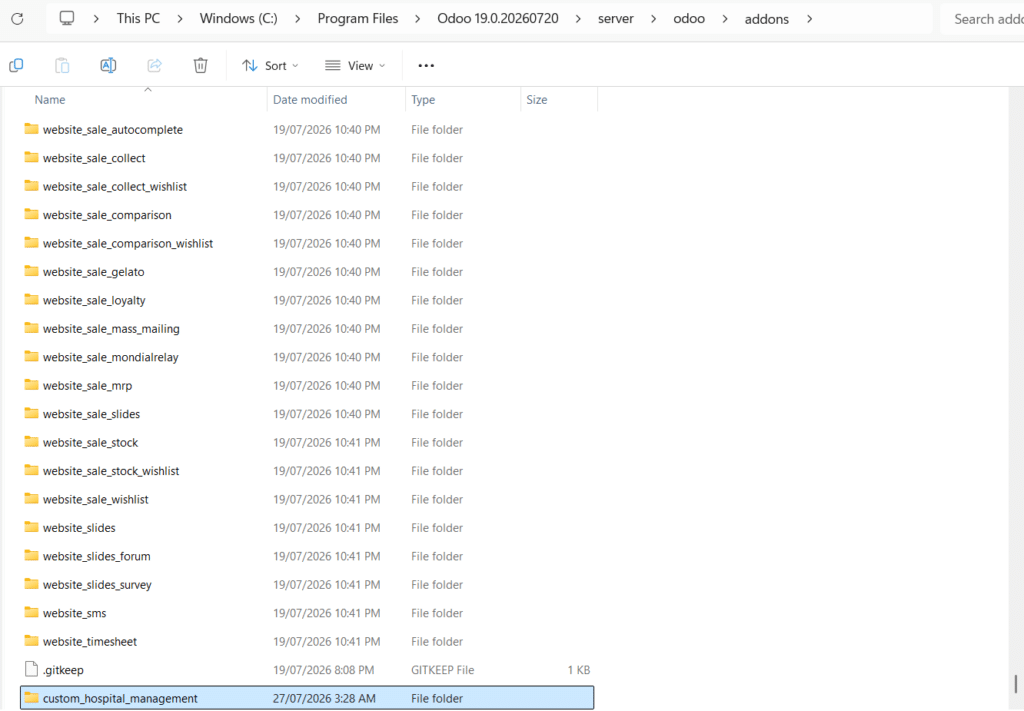
Step 1: Locate the custom-addons Directory in File Explorer
If you are running Odoo locally on Windows:
- Open File Explorer by pressing Ctrl + E.
- Navigate to your installation path (typically C:\Program Files\Odoo 19.0\server\odoo\addons or custom-addons).
- You can paste your folder path directly into the File Explorer address bar.
Crucial Rule on Folder Naming: Pick one clean, lowercase name for your custom module folder using underscores instead of spaces or hyphens (for example: custom_hospital_management or real_estate). Throughout this guide, we will strictly use custom_hospital_management across all code files, paths, and configurations.
Step 2: Create the Module Directory Structure
Inside your custom-addons directory, create a main folder named custom_hospital_management. Inside that main folder, create three sub-folders:
- models/ — Holds all Python files that construct database tables and business logic.
- views/ — Holds all XML files that render screens, forms, tables, and top navigation menus.
- security/ — Holds CSV files that grant users access permissions to your database tables.
Chapter 1: The Odoo Module Architecture
Every Odoo module is a self-contained directory containing Python code, XML layouts, and security rules.
Complete Directory Layout
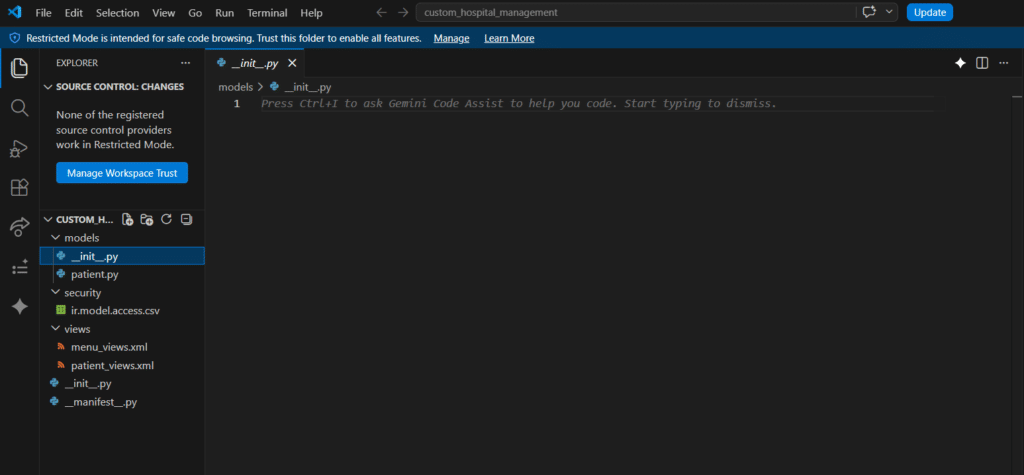
When viewed inside Visual Studio Code or File Explorer, your module structure must look like this:
Plaintext
custom_hospital_management/
│
├── __init__.py <– Root Python file initializing the module package
├── __manifest__.py <– Module configuration, metadata, and loading sequence
│
├── models/ <– Python database layer
│ ├── __init__.py <– Registers all model Python files
│ └── patient.py <– Patient database schema & logic
│
├── views/ <– XML user interface layer
│ ├── patient_views.xml <– Form and list (tree) view definitions
│ └── menu_views.xml <– Top menu navigation links
│
└── security/ <– Access control security layer
└── ir.model.access.csv <– Security rights (Read, Write, Create, Delete)
Chapter 2: Module Registration (__manifest__.py)
The __manifest__.py file tells Odoo what your app does, what base Odoo apps it depends on, and which data files to load into PostgreSQL.
When viewed inside Visual Studio Code or File Explorer, your module structure must look like this:
Manifest Configuration Code
File location: custom_hospital_management/__manifest__.py
Python
{
‘name’: ‘Hospital Management’,
‘version’: ‘1.0.0’,
‘summary’: ‘Manage patient records, appointments, and medical histories’,
‘category’: ‘Healthcare’,
‘author’: ‘Your Company Name’,
‘license’: ‘LGPL-3’,
# Dependencies: List official Odoo apps required before this module can be installed
‘depends’: [‘base’],
# Data Files: Must be listed in STRICT sequential dependency order
‘data’: [
‘security/ir.model.access.csv’, # 1. Security MUST load first
‘views/patient_views.xml’, # 2. Views and window actions MUST load second
‘views/menu_views.xml’, # 3. Menus referencing actions MUST load last
],
‘installable’: True,
‘application’: True, # Setting to True places this app on the main Odoo dashboard
}
Core Concept: Why Manifest Order Matters
Odoo executes files listed inside ‘data’: […] strictly from top to bottom:
- If views/menu_views.xml is placed above views/patient_views.xml, Odoo will crash with an External ID not found error because the menu will try to link to an action that hasn’t been created yet.
- Security files (ir.model.access.csv) must always sit at the top so permissions are active before screens are drawn.
Chapter 3: Creating Database Tables (Models & ORM Fields)
In Odoo, you do not write raw SQL statements (like CREATE TABLE). Instead, you define Python classes inheriting from models.Model. Odoo’s Object-Relational Mapping (ORM) creates and updates the underlying PostgreSQL database automatically.
Step 1: Register the Models Directory
File location: custom_hospital_management/__init__.py
Python
from . import models
File location: custom_hospital_management/models/__init__.py
Python
from . import patient
Step 2: Define the Model & Data Fields
File location: custom_hospital_management/models/patient.py
Python
from odoo import models, fields, api
class HospitalPatient(models.Model):
# Technical database table identifier created in PostgreSQL: “hospital_patient”
_name = ‘hospital.patient’
_description = ‘Hospital Patient Record’
# Standard Database Fields
name = fields.Char(string=’Full Name’, required=True)
age = fields.Integer(string=’Age’)
gender = fields.Selection([
(‘male’, ‘Male’),
(‘female’, ‘Female’),
(‘other’, ‘Other’),
], string=’Gender’, default=’male’)
note = fields.Text(string=’Medical History’)
active = fields.Boolean(string=’Active’, default=True)
# State tracking field for record lifecycles
state = fields.Selection([
(‘draft’, ‘Draft’),
(‘confirmed’, ‘Confirmed’),
(‘done’, ‘Done’),
(‘cancel’, ‘Cancelled’),
], string=’Status’, default=’draft’, required=True)
# Computed Field: Calculates values dynamically on the fly
is_minor = fields.Boolean(string=’Is Minor’, compute=’_compute_is_minor’)
@api.depends(‘age’)
def _compute_is_minor(self):
# ALWAYS loop over ‘self’ because Odoo handles records in batches (recordsets)
for record in self:
if record.age and record.age < 18:
record.is_minor = True
else:
record.is_minor = False
# Workflow Action Methods (Connected to UI Buttons)
def action_confirm(self):
for record in self:
record.state = ‘confirmed’
def action_done(self):
for record in self:
record.state = ‘done’
def action_cancel(self):
for record in self:
record.state = ‘cancel’
Core Concept: Key Naming Rules
- _name = ‘hospital.patient’: The technical ID for your model. Dots are automatically converted to underscores in SQL tables (hospital_patient).
- for record in self:: Never omit this loop inside compute methods or action buttons. Odoo passes lists of records (self); failing to loop will crash the system when performing bulk edits.
Chapter 4: Setting Up Access Rights (ir.model.access.csv)
By default, Odoo hides and blocks access to new database tables for security. You must explicitly define permission rules in your security file.
Permission Configuration Code
File location: custom_hospital_management/security/ir.model.access.csv
Code snippet
id,name,model_id:id,group_id:id,perm_read,perm_write,perm_create,perm_unlink
access_hospital_patient_user,access.hospital.patient.user,model_hospital_patient,base.group_user,1,1,1,1
Core Concept: The Model ID Rule
Look closely at column 3 (model_id:id):
- Take your model _name from Python: hospital.patient.
- Replace all dots with underscores: hospital_patient.
- Add model_ in front: model_hospital_patient.
The numbers 1,1,1,1 at the end grant Read, Write, Create, and Delete permissions respectively to standard internal users (base.group_user).
Chapter 5: Designing the User Interface (Views & Menus)
Odoo renders web views using XML. The two primary layouts are:
- Tree View (List View): Displays records in a multi-row table.
- Form View: Displays the detailed view when opening an individual record.
Step 1: Create Views & Window Actions
File location: custom_hospital_management/views/patient_views.xml
XML
<odoo>
<!– 1. Tree (List) View Definition –>
<record id=”view_hospital_patient_tree” model=”ir.ui.view”>
<field name=”name”>hospital.patient.tree</field>
<field name=”model”>hospital.patient</field>
<field name=”arch” type=”xml”>
<tree>
<field name=”name”/>
<field name=”age”/>
<field name=”gender”/>
<field name=”state”/>
<field name=”is_minor”/>
</tree>
</field>
</record>
<!– 2. Form View Definition –>
<record id=”view_hospital_patient_form” model=”ir.ui.view”>
<field name=”name”>hospital.patient.form</field>
<field name=”model”>hospital.patient</field>
<field name=”arch” type=”xml”>
<form>
<!– Workflow Header Buttons & Statusbar –>
<header>
<!– Modern Odoo 17+ invisible conditions –>
<button name=”action_confirm” string=”Confirm” type=”object” class=”oe_highlight” invisible=”state != ‘draft'”/>
<button name=”action_done” string=”Mark as Done” type=”object” class=”oe_highlight” invisible=”state != ‘confirmed'”/>
<button name=”action_cancel” string=”Cancel” type=”object” invisible=”state in (‘done’, ‘cancel’)”/>
<field name=”state” widget=”statusbar” statusbar_visible=”draft,confirmed,done”/>
</header>
<sheet>
<group>
<group>
<field name=”name”/>
<field name=”age”/>
<field name=”gender”/>
</group>
<group>
<field name=”is_minor”/>
<field name=”active”/>
</group>
</group>
<notebook>
<page string=”Medical History”>
<field name=”note”/>
</page>
</notebook>
</sheet>
</form>
</field>
</record>
<!– 3. Window Action: Instructions on what views to launch –>
<record id=”action_hospital_patient” model=”ir.actions.act_window”>
<field name=”name”>Patients</field>
<field name=”res_model”>hospital.patient</field>
<field name=”view_mode”>tree,form</field>
</record>
</odoo>
Step 2: Create Navigation Menus
File location: custom_hospital_management/views/menu_views.xml
XML
<odoo>
<!– Top-level Navigation App Icon –>
<menuitem id=”menu_hospital_root” name=”Hospital” sequence=”10″/>
<!– Sub-menu Category Dropdown –>
<menuitem id=”menu_hospital_patients_cat” name=”Patients” parent=”menu_hospital_root” sequence=”10″/>
<!– Action Link: Launches the window action defined in patient_views.xml –>
<menuitem id=”menu_hospital_patient_records” name=”All Patients” parent=”menu_hospital_patients_cat” action=”action_hospital_patient” sequence=”10″/>
</odoo>
Core Concept: Modern Button Conditions (invisible=)
In modern versions of Odoo (Odoo 17, 18, and 19), legacy states=”…” tags on form buttons are deprecated. Use the invisible domain condition:
- invisible=”state != ‘draft'” hides the button whenever the state is not draft.
- invisible=”state in (‘done’, ‘cancel’)” hides the button if the record reaches completion or cancellation.
Chapter 6: Extending Native Odoo Apps (_inherit)
Most real-world projects involve modifying standard Odoo apps (like adding custom fields to Sales Orders or Customer records). This is done using inheritance.
Step 1: Python Extension
File location: custom_hospital_management/models/sale_order_inherit.py
Python
from odoo import models, fields
class SaleOrder(models.Model):
# _inherit tells Odoo to modify the existing ‘sale.order’ table instead of creating a new one
_inherit = ‘sale.order’
driver_notes = fields.Char(string=’Delivery Instructions’)
Step 2: XML UI Extension (<xpath>)
File location: custom_hospital_management/views/sale_order_views.xml
XML
<odoo>
<record id=”view_order_form_inherit” model=”ir.ui.view”>
<field name=”name”>sale.order.form.inherit</field>
<field name=”model”>sale.order</field>
<field name=”inherit_id” ref=”sale.view_order_form”/>
<field name=”arch” type=”xml”>
<!– Target the existing payment_term_id field and insert driver_notes directly below it –>
<xpath expr=”//field[@name=’payment_term_id’]” position=”after”>
<field name=”driver_notes”/>
</xpath>
</field>
</record>
</odoo>
Chapter 7: Updating & Deploying Custom Changes
Whenever you modify .py files or .xml layout files, follow these steps to load the updates into Odoo:
- Restart the Server Service:
- Windows: Press Ctrl + Shift + Esc (Task Manager) ➔ Services tab ➔ Right-click odoo-server ➔ Restart.
- Linux: Run sudo systemctl restart odoo in your terminal.
2.Upgrade the Module in Odoo:
- Activate Developer Mode in Odoo (Settings ➔ scroll down and click Activate the developer mode).
- Go to the Apps menu ➔ click Update Apps List in the top navigation bar.
- Search for Hospital Management (or custom_hospital_management) and click Activate (or Upgrade).
Chapter 8: Fast CLI Terminal Commands
Instead of using the Odoo web UI to upgrade your module every time you edit code, run this terminal command to force Odoo to auto-upgrade your app on launch:
Terminal Command Syntax
- Windows Command Prompt:
- DOS
python odoo-bin -c odoo.conf -d your_database_name -u custom_hospital_management –dev=xml
- Linux / Mac Terminal:
- Bash
./odoo-bin -c /etc/odoo/odoo.conf -d your_database_name -u custom_hospital_management –dev=xml
Flag Reference
- -d <db_name>: Specifies your active PostgreSQL database name.
- -u <module_name>: (Update Flag) Forces an immediate upgrade of your custom module on boot.
- –dev=xml: Allows live XML reloads—saving an XML file instantly updates the page on browser refresh without restarting the server.
Chapter 9: Common Errors & Troubleshooting
Error Message / Issue | Primary Cause | How to Fix |
ParseError: External ID not found | XML/CSV files are listed in the wrong order inside __manifest__.py. | Reorder ‘data’: […] in __manifest__.py. Security files must be listed before views, and actions before menus. |
AccessError: You are not allowed to modify… | Missing entry inside ir.model.access.csv or incorrect model ID syntax. | Verify ir.model.access.csv. Ensure column 3 follows the pattern model_your_model_name. |
AttributeError: ‘hospital.patient’ object has no attribute ‘x’ | Python code was edited, but the Odoo server service hasn’t reloaded yet. | Restart the Odoo service and upgrade your module via the Apps menu or terminal. |
XML Validation Error (states=) | Using legacy Odoo 16 or earlier syntax for buttons on newer Odoo versions. | Replace states=”draft” with invisible=”state != ‘draft'” in your button XML. |
Chapter 10: One-Page Developer Cheat Sheet
Directory Reference
Plaintext
custom_hospital_management/
├── __init__.py <– Root import: from . import models
├── __manifest__.py <– Load order & dependencies
├── models/
│ ├── __init__.py <– Model import: from . import patient
│ └── patient.py <– Schema & Python logic
├── views/
│ ├── patient_views.xml <– Form & Tree XML layouts
│ └── menu_views.xml <– Navigation menu XML
└── security/
└── ir.model.access.csv <– CRUD Permissions
Essential ORM Fields
Field Type | Python Example | Usage |
Char | name = fields.Char(string=’Name’, required=True) | Single line text |
Text | notes = fields.Text(string=’Notes’) | Multi-line text box |
Integer | age = fields.Integer(string=’Age’) | Whole numbers |
Selection | gender = fields.Selection([(‘m’, ‘Male’), (‘f’, ‘Female’)]) | Dropdown list |
Boolean | active = fields.Boolean(string=’Active’, default=True) | Checkbox |
Many2one | partner_id = fields.Many2one(‘res.partner’, string=’Customer’) | Foreign key link |
Core Developer Rules
- Manifest File Sequence: Security CSV first, Views second, Menus last.
- Security ID Mapping: Model hospital.patient ➔ CSV ID model_hospital_patient.
- Recordset Loops: Always wrap computed logic in for record in self:.
What to read next
Software Audit Simplified: How We Do It at Techbot
Software Audit Simplified: How We Do It at Techbot
Moossa M. Alavi
Founder & CEO of Techbot ERP
Moossa M. Alavi is the Founder & CEO of Techbot ERP and Altamyz Advertising. He is a certified Odoo consultant with more than 27 years of experience in business, advertising, and ERP software. Moossa started his career in the UAE in 1997 with a well-known group in Abu Dhabi. Over the years, he built his own companies to help other businesses work better using technology. Moossa helps with customized ERP implementation for various industries, including manufacturing, insurance, supercar rental, and logistics, through Techbot ERP. He resolves these issues with Odoo ERP and supports businesses in growing with the right assets and guidance. Moossa has received many awards for his work, including the Arabian Best of Best Award and the Industry Leader Award from BNI UAE. He is also a BNI Ambassador and mentors other business owners. He believes in giving back to the community and helping others grow, following the “Givers Gain” principle.
Share this post
Latest Post
Recent Posts
- Beyond Automation: How Odoo’s Hidden AI Capabilities Drive Modern Business Efficiency
- Odoo 20 AI : All New Features
- Odoo 20 New Features (2026): AI, POS, HR, Accounting & More Explained
- Odoo Developer Guide: Data Security & Access Controls in Odoo
- Odoo Custom Module Development: Step-by-Step Tutorial
- Software Audit Simplified: How We Do It at Techbot
- Odoo vs Odoo Partner: How to Decide Which Is Right for Your Business
- How our ERP solution simplifies multi property management
- UAE E‑Invoicing Phases and Deadlines: What Businesses Need to Know | A Complete Guide
- Odoo Pricing Guide for the UAE 2026 | Key Factors to Consider Before Your Implementation
Software Audit That Actually Improves Your Day to Day Work
Most teams already have the tools they need. Yet they struggle because the software they already have is not working the way it should.
You might be dealing with duplicate data entry, slow workflows, tools that do not talk to each other, or features you know exist but no one really uses. Over time, this creates friction that quietly drains productivity.
A good software audit fixes that. Not by adding more tools, but by making your current systems finally work the way your business needs them to.
Where Businesses Usually Lose Efficiency
Before we even look at tools, we look at how work is getting done. That is where the real problems show up.
Common issues we see:
- Teams switching between multiple platforms to complete a single task
- Manual work that could be automated but is not
- Reports that take hours to prepare instead of being instant
- Different departments using disconnected systems
- Paying for software features that are never used
These are not technical problems. They are operational inefficiencies caused by misaligned systems.
How We Approach Software Audits at Techbot
Our process is built around improving how your team actually works, not just evaluating software on paper.
1. We Map How Work Really Happens
We start by understanding how your team actually works.
This includes mapping your processes, identifying dependencies, and uncovering how tasks move across departments. Only after this do we evaluate the role your current systems play.
This approach ensures that any recommendations are built around your business, not forced onto it.
2. We Find Quick Wins First
Not every improvement needs a major overhaul.
Sometimes small changes like enabling a feature, adjusting permissions, or restructuring a workflow can immediately save hours of work each week.
We prioritize these quick wins so you see results early.
3. We Eliminate Redundancy
Many businesses use multiple tools for things that could be handled in one system.
We identify overlaps and opportunities to consolidate, which reduces cost and simplifies operations.
4. We Improve Data Flow
Data should move seamlessly across your business.
We fix broken integrations, remove duplicate data entry, and ensure that information flows smoothly between departments.
This is where businesses start seeing real clarity in their operations.
5. We Align Software With Business Goals
Your software should support how your business wants to grow.
We evaluate whether your current setup can scale, and if not, what needs to change to support future expansion.
6. We Do Not Stop at Recommendations
A report alone does not create impact.
We help implement the improvements, train your team, and ensure the changes actually stick.
What You Get After a Proper Audit
When done right, a software audit leads to tangible improvements:
- Faster workflows
- Less manual work
- Better reporting and visibility
- Lower software costs
- More confident decision making
Most importantly, your team spends less time fighting systems and more time doing meaningful work.
Transform the way you manage projects, sales, and finance with Odoo ERP designed for UAE real estate management.


Get the latest tips and updates on ERP software solutions. Subscribe to our newsletter and stay ahead in business!
Latest Post
Recent Posts
- Beyond Automation: How Odoo’s Hidden AI Capabilities Drive Modern Business Efficiency
- Odoo 20 AI : All New Features
- Odoo 20 New Features (2026): AI, POS, HR, Accounting & More Explained
- Odoo Developer Guide: Data Security & Access Controls in Odoo
- Odoo Custom Module Development: Step-by-Step Tutorial
- Software Audit Simplified: How We Do It at Techbot
- Odoo vs Odoo Partner: How to Decide Which Is Right for Your Business
- How our ERP solution simplifies multi property management
- UAE E‑Invoicing Phases and Deadlines: What Businesses Need to Know | A Complete Guide
- Odoo Pricing Guide for the UAE 2026 | Key Factors to Consider Before Your Implementation
What to read next
UAE E‑Invoicing Phases and Deadlines: What Businesses Need to Know | A Complete Guide
UAE E‑Invoicing Phases and Deadlines: What Businesses Need to Know | A Complete Guide
Share this post
Latest Post
Recent Posts
- Beyond Automation: How Odoo’s Hidden AI Capabilities Drive Modern Business Efficiency
- Odoo 20 AI : All New Features
- Odoo 20 New Features (2026): AI, POS, HR, Accounting & More Explained
- Odoo Developer Guide: Data Security & Access Controls in Odoo
- Odoo Custom Module Development: Step-by-Step Tutorial
- Software Audit Simplified: How We Do It at Techbot
- Odoo vs Odoo Partner: How to Decide Which Is Right for Your Business
- How our ERP solution simplifies multi property management
- UAE E‑Invoicing Phases and Deadlines: What Businesses Need to Know | A Complete Guide
- Odoo Pricing Guide for the UAE 2026 | Key Factors to Consider Before Your Implementation
What Is UAE E‑Invoicing and Why Is It Being Introduced?
E-invoicing refers to the electronic creation, exchange, validation, and storage of invoices in a structured format (not PDF or paper). The UAE’s implementation is aligned with global digital tax strategies promoting:
- Real-time VAT validation
- Increased transparency and anti-fraud measures
- Automation of compliance and reporting
- Alignment with systems like KSA’s ZATCA and EU’s Peppol
The UAE’s chosen structure is the PINT AE (Peppol International UAE) standard, an XML-based format tailored for local regulations.
UAE E‑Invoicing Rollout Timeline
The Ministry of Finance has announced a phased rollout to ensure smooth nationwide adoption:
Phase 1: Pilot (Voluntary Participation)
- Starts 1 July 2026
- Open to early adopters to test systems and integrations
Phase 2: Mandatory for Large Taxpayers
- Applies to businesses with annual revenue ≥ AED 50 million
- Must appoint an ASP by 31 July 2026
- Mandatory go-live: 1 January 2027
Phase 3: Mandatory for All Other VAT-Registered Businesses
- Revenue < AED 50 million
- Must appoint ASP by 31 March 2027
- Go-live: 1 July 2027
Phase 4: B2G Transactions (Government Entities)
- ASP appointment by 31 March 2027
- Mandatory go-live: 1 October 2027
What are Accredited Service Providers (ASPs), aka The ‘Call Connectors’ of E‑Invoicing
To simplify this: think of an Accredited Service Provider (ASP) like your telecom provider for example, Etisalat or du.
When you make a phone call, your phone doesn’t connect directly to the recipient. Instead, the telecom provider validates, routes, and secures the connection.
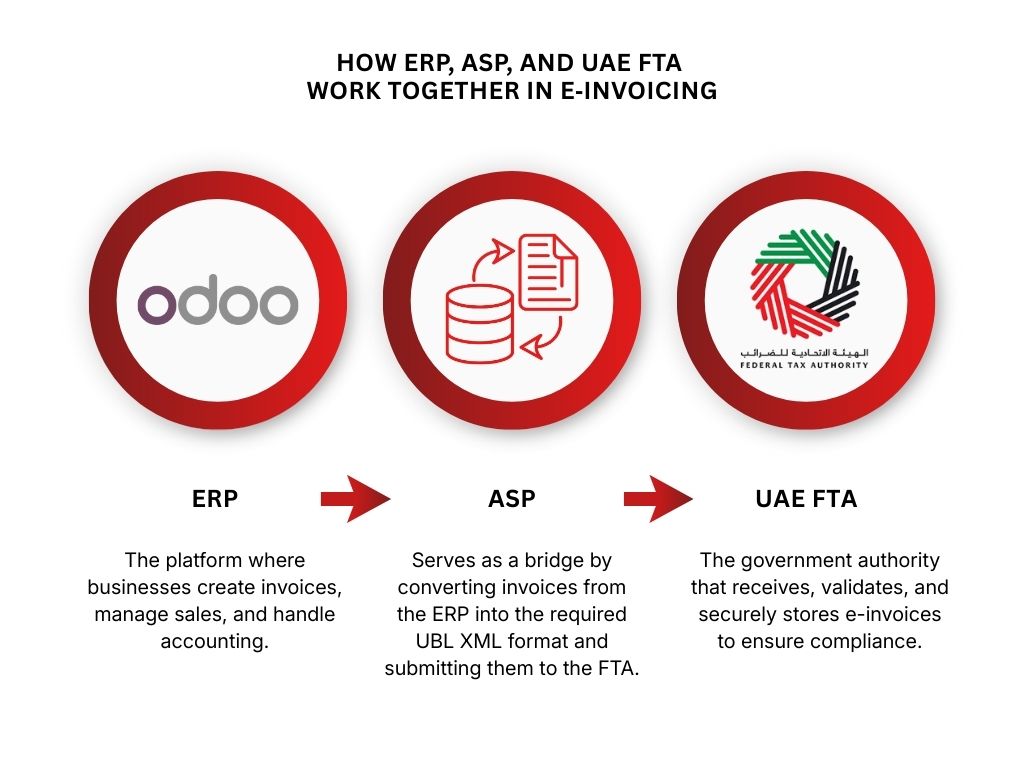
E-invoicing follows the same principle:
- Your ERP system (like Odoo) creates the invoice.
- The ASP validates and transmits it to the UAE’s Federal Tax Authority (FTA).
- The FTA logs and accepts the transaction.
- The ASP’s job includes:
- Ensuring the invoice meets PINT AE format.
- Digitally signing and timestamping the invoice.
- Transmitting it in real time to the FTA.
- Archiving it according to UAE regulations.
Important Clarification: ERP ≠ ASP
A common misconception is that your ERP or invoicing system handles everything.
But even if you use a powerful system like Odoo, it’s not an ASP and cannot legally submit invoices to the FTA on its own.
Odoo = Invoice Creator
ASP = Invoice Validator + Transmitter
FTA = Official Receiver & Auditor
At Techbot, we help you integrate Odoo with FTA-approved ASPs, ensuring end-to-end e-invoicing compliance.
The PINT AE Format
PINT AE (Peppol International for the UAE) is the mandated e-invoice format machine-readable, highly structured, and legally binding.
It includes data like:
- Unique invoice number and timestamp
- Seller and buyer details (TRN, VAT, etc.)
- VAT breakdown
- Total values in AED
- Digital signature and ASP metadata
Paper and PDF invoices will no longer be acceptable once the mandate takes effect for your business segment.
Preparing Your Business for Compliance
Here’s how to stay ahead of the mandate:
- Review Your ERP System Ensure it can generate invoices in the PINT AE format and supports API integration with ASPs.
- Select a Certified ASP Choose an FTA-approved ASP early to allow testing, integration, and onboarding support.
- Integrate ERP + ASP Our team at Techbot ensures your Odoo ERP is integrated with your chosen ASP for real-time, compliant e-invoice flow.
- Train Finance & IT Teams Ensure everyone understands the new invoice flow, error handling, and audit trail requirements.
What Happens If You Don’t Comply?
Starting 2027, non-compliant businesses risk:
- FTA penalties for delayed onboarding
- Invoice rejections impacting payment cycles
- Loss of VAT input claims
- Exclusion from public tenders (B2G)
- Operational delays and audits
Benefits Beyond Compliance
- Faster invoice processing and payment
- Reduced manual reconciliation
- Real-time financial insights
- Stronger internal controls
- Readiness for future digital mandates
How Techbot + Odoo Empower You to Comply
As a certified Odoo Gold Partner, Techbot provides:
- Customized Odoo configurations for PINT AE invoice generation.
- Full ERP + ASP integration workflows.
- Real-time validation & error-handling tools.
- Training and onboarding support for your internal teams.
- Continuous updates as UAE regulations evolve.
Conclusion: Take Action Before the Mandate Hits
E-invoicing in the UAE isn’t a future problem it’s a present-day priority.
By preparing early, integrating with ASPs, and optimizing your ERP, you’ll not only avoid penalties you’ll drive efficiency, speed, and digital maturity across your business.
At Techbot, we’re here to help you achieve 100% compliance and unlock the value beyond it.
FAQs
Is Odoo an ASP?
No. Odoo is your ERP system. You need to connect it to an FTA-accredited ASP to submit invoices.
What is the ASP’s exact role?
Validate, digitally sign, and submit your invoices to the FTA in real time.
Can I still use PDF invoices?
No. Only PINT AE-formatted XML invoices submitted via ASP will be accepted once the mandate starts.
When does the UAE e-invoicing mandate become mandatory?
- 1 January 2027 for large businesses (annual revenue ≥ AED 50 million)
- 1 July 2027 for others
- 1 October 2027 for B2G transactions (businesses dealing with government entities)
How can Techbot help?
We integrate your Odoo ERP with certified ASPs, configure PINT AE invoicing, train your teams, and ensure full compliance.
Why is e-invoicing mandatory in the UAE?
The FTA mandates UAE electronic invoicing to improve transparency, reduce tax errors, and ensure accurate VAT reporting across all registered businesses.
Who sets the e-invoicing requirements in the UAE?
The Federal Tax Authority (FTA) defines all UAE e-invoicing requirements, including invoice format, submission process, and compliance timelines.
How does UAE e-invoicing affect VAT compliance?
With UAE electronic invoicing, all invoices are digitally tracked by the FTA, making VAT reporting and compliance more accurate and easier to audit.
Can e-invoicing in the UAE be done without an ASP?
No. All UAE e-invoicing requirements mandate that invoices be submitted via an FTA-accredited ASP in the correct PINT AE XML format.
As defined by the Federal Tax Authority for UAE electronic invoicing and VAT compliance.
Transform the way you manage projects, sales, and finance with Odoo ERP designed for UAE real estate management.
Get the latest tips and updates on ERP software solutions. Subscribe to our newsletter and stay ahead in business!
Latest Post
Recent Posts
- Beyond Automation: How Odoo’s Hidden AI Capabilities Drive Modern Business Efficiency
- Odoo 20 AI : All New Features
- Odoo 20 New Features (2026): AI, POS, HR, Accounting & More Explained
- Odoo Developer Guide: Data Security & Access Controls in Odoo
- Odoo Custom Module Development: Step-by-Step Tutorial
- Software Audit Simplified: How We Do It at Techbot
- Odoo vs Odoo Partner: How to Decide Which Is Right for Your Business
- How our ERP solution simplifies multi property management
- UAE E‑Invoicing Phases and Deadlines: What Businesses Need to Know | A Complete Guide
- Odoo Pricing Guide for the UAE 2026 | Key Factors to Consider Before Your Implementation
What to read next
Odoo Pricing Guide for the UAE 2026 | Key Factors to Consider Before Your Implementation
Odoo Pricing Guide for the UAE 2026 | Key Factors to Consider Before Your Implementation
Moossa M. Alavi
Moossa M. Alavi is the Founder & CEO of Techbot ERP and Altamyz Advertising. He is a certified Odoo consultant with more than 27 years of experience in business, advertising, and ERP software. Moossa started his career in the UAE in 1997 with a well-known group in Abu Dhabi. Over the years, he built his own companies to help other businesses work better using technology. Moossa helps with customized ERP implementation for various industries, including manufacturing, insurance, supercar rental, and logistics, through Techbot ERP. He resolves these issues with Odoo ERP and supports businesses in growing with the right assets and guidance. Moossa has received many awards for his work, including the Arabian Best of Best Award and the Industry Leader Award from BNI UAE. He is also a BNI Ambassador and mentors other business owners. He believes in giving back to the community and helping others grow, following the “Givers Gain” principle.
Share this post
Latest Post
Recent Posts
- Beyond Automation: How Odoo’s Hidden AI Capabilities Drive Modern Business Efficiency
- Odoo 20 AI : All New Features
- Odoo 20 New Features (2026): AI, POS, HR, Accounting & More Explained
- Odoo Developer Guide: Data Security & Access Controls in Odoo
- Odoo Custom Module Development: Step-by-Step Tutorial
- Software Audit Simplified: How We Do It at Techbot
- Odoo vs Odoo Partner: How to Decide Which Is Right for Your Business
- How our ERP solution simplifies multi property management
- UAE E‑Invoicing Phases and Deadlines: What Businesses Need to Know | A Complete Guide
- Odoo Pricing Guide for the UAE 2026 | Key Factors to Consider Before Your Implementation
Disclaimer:
This blog does not provide exact figures. Instead, it outlines the key factors you should consider when evaluating your Odoo implementation budget.
Read the TL;DR version (quick summary)
Understanding What Influences Your Odoo Pricing
Before diving into the details of Odoo pricing, it’s important to understand that no two businesses will have the exact same cost. Odoo’s pricing structure depends on several variables, and because every business has different workflows, team sizes, and module needs, giving a single fixed estimate is impossible.
If you’re trying to estimate your Odoo cost in the UAE, this guide gives a clear breakdown of every factor that affects the final price. These essentials we detail determine the baseline of your Odoo cost and are the first things you should consider when estimating your budget.
Below, we break down these key factors to help you understand what impacts your Odoo pricing the most.
Number of Users
Pricing is per user/month.
More users = higher subscription cost.
A user is any person who needs backend access to Odoo to do things like:
- Create or edit records
- Approve tasks
- Manage inventory
- Send invoices
- Update CRM deals
- Run reports
- Access settings
Who does NOT count as a user?
Employees who only use a portal.
Portal access is free. Portal users can log in to a simple interface that lets them view their documents, track orders, check tickets, and approve or comment when allowed.
Typical real-world example
A company with 100 employees may only need 7–15 actual Odoo users, such as:
- 3 salespeople
- 2 accountants
- 2 operations staff
- 1 HR admin
- 1 manager
The rest of the company never logs into the backend, so they don’t need user licenses.
Implementation
Even though Odoo provides the software, most businesses rely on
certified Odoo partners to set up the system correctly,
customize workflows, and ensure a smooth transition.
Here’s how we handle Odoo Implementation!
These four subcategories break down the implementation in terms of cost :-
1. Modules
When you buy the standard Odoo plan, you get all 12 core modules (listed below). You only pay for additional ones.
However, modules can affect your total cost indirectly:
- Implementation effort – Using many modules may require more setup, configuration, or partner support.
- More users – If more staff need to access these modules, your per-user subscription cost goes up.
- Custom or third-party modules – Extra apps or custom features may have separate fees.
In short: Standard modules are included, but more users, setup, and custom apps can increase your total cost.
Modules included in the standard plan:
2. Customization Hours
The total time required to tailor Odoo to your specific workflows, add custom features, or modify existing modules to match your business needs.
3. On-site Man-days
The number of days our consultants spend at your location to configure the system, train staff, and ensure everything runs smoothly.
4. Number of companies
The total instances or business entities you plan to manage in Odoo, as each company may require separate configurations and data setup.
For a full overview of our Odoo services, visit our homepage!
Support / AMC
An AMC (Annual Maintenance Contract) is basically a yearly service agreement that ensures your Odoo system keeps working smoothly after the initial setup. In our case,
- We provide an initial support of 3 months for free.
- After that, clients can opt for an AMC, which is typically
25% of the implementation fees per year and provides ongoing, annual support.
Odoo Edition / Hosting Type
This refers to how and where your Odoo system is hosted, which affects both cost and setup.
You can choose:
1. Odoo Online (Cloud / SaaS) (FREE)
- Fully hosted by Odoo, with automatic updates, backups, and maintenance.
- Odoo Online is easy to use, but it doesn’t allow customizations.
2. Odoo.sh (Managed Cloud Platform)
- This is also hosted by Odoo, but unlike Odoo Online, it gives you full freedom to customize, install your own modules, and develop anything you need. While Odoo still handles hosting, backups, and server management for you.
3. Self-Hosted
- You manage everything yourself: server setup, updates, security, backups, and performance.
- It’s the best choice for businesses that need deep customization, full data control, or specific infrastructure requirements.
4. Partner Managed Hosting
- Your partner provides the server, handles setup, takes care of maintenance, monitors performance, applies updates, and manages backups. Giving you a fully managed, worry-free environment tailored to your needs.
Partner Support
What Partners Do That Odoo Doesn’t
We handle tasks that Odoo alone does not:
- Custom configuration of modules and workflows to fit your unique business processes
- Data migration from legacy systems or spreadsheets
- Integration with other software your company uses
- Training employees so they can use the system efficiently
- Ongoing support and troubleshooting for issues specific to your setup
- Ensuring best practices that reduce errors and maximize ROI
In short: partners bridge the gap between the software and your actual business operations, making sure Odoo works for your specific needs.
Support levels
- Basic setup – A simple installation and configuration for small businesses, generally the lowest partner cost.
- Full implementation – Complete setup, data migration, training, and ongoing support for medium to large companies, which commands a higher price.
For precise, personalized pricing, reach out to us and we’ll guide you!
Transform the way you manage projects, sales, and finance with Odoo ERP designed for UAE real estate management.
TL;DR: Odoo Pricing Guide for the UAE
- Costs vary by business:
No two companies have the same price; depends on users, modules, customization, and implementation needs. - Users matter:
Only backend users count for subscription; portal users are free. - Implementation:
Partners help with module setup, customization, on-site support, and managing multiple companies. Learn more - Support / AMC:
Initial 3 months free, then optional AMC (≈25% of implementation fees per year) for ongoing support. Details here - Hosting options:
Odoo Online (cloud), Odoo.sh (managed cloud), Self-Hosted, or Partner Managed Hosting.
Each has different flexibility and cost. - Partner support adds value: Custom workflows, data migration, integrations, employee training, ongoing troubleshooting, and best practices.
- Support levels:
Basic setup (small businesses) vs Full implementation (medium–large businesses).
Get the latest tips and updates on ERP software solutions. Subscribe to our newsletter and stay ahead in business!
Latest Post
Recent Posts
- Beyond Automation: How Odoo’s Hidden AI Capabilities Drive Modern Business Efficiency
- Odoo 20 AI : All New Features
- Odoo 20 New Features (2026): AI, POS, HR, Accounting & More Explained
- Odoo Developer Guide: Data Security & Access Controls in Odoo
- Odoo Custom Module Development: Step-by-Step Tutorial
- Software Audit Simplified: How We Do It at Techbot
- Odoo vs Odoo Partner: How to Decide Which Is Right for Your Business
- How our ERP solution simplifies multi property management
- UAE E‑Invoicing Phases and Deadlines: What Businesses Need to Know | A Complete Guide
- Odoo Pricing Guide for the UAE 2026 | Key Factors to Consider Before Your Implementation
What to read next
Why Clean Data Drives The Highest ROI In Real Estate ERP Projects
Why Clean Data Drives The Highest ROI In Real Estate ERP Projects
Moossa M. Alavi
Moossa M. Alavi is the Founder & CEO of Techbot ERP and Altamyz Advertising. He is a certified Odoo consultant with more than 27 years of experience in business, advertising, and ERP software. Moossa started his career in the UAE in 1997 with a well-known group in Abu Dhabi. Over the years, he built his own companies to help other businesses work better using technology. Moossa helps with customized ERP implementation for various industries, including manufacturing, insurance, supercar rental, and logistics, through Techbot ERP. He resolves these issues with Odoo ERP and supports businesses in growing with the right assets and guidance. Moossa has received many awards for his work, including the Arabian Best of Best Award and the Industry Leader Award from BNI UAE. He is also a BNI Ambassador and mentors other business owners. He believes in giving back to the community and helping others grow, following the “Givers Gain” principle.
Share this post
Latest Post
Recent Posts
- Beyond Automation: How Odoo’s Hidden AI Capabilities Drive Modern Business Efficiency
- Odoo 20 AI : All New Features
- Odoo 20 New Features (2026): AI, POS, HR, Accounting & More Explained
- Odoo Developer Guide: Data Security & Access Controls in Odoo
- Odoo Custom Module Development: Step-by-Step Tutorial
- Software Audit Simplified: How We Do It at Techbot
- Odoo vs Odoo Partner: How to Decide Which Is Right for Your Business
- How our ERP solution simplifies multi property management
- UAE E‑Invoicing Phases and Deadlines: What Businesses Need to Know | A Complete Guide
- Odoo Pricing Guide for the UAE 2026 | Key Factors to Consider Before Your Implementation
The UAE real estate market is moving faster than ever. Developers are launching new communities, off plan units are selling rapidly, and customers expect clear information at every stage. Every sale, reservation, payment plan, handover, and compliance update depends on one foundation. Clean, accurate, and consistently maintained data. Yet many real estate teams in the UAE discover the same issue when they begin planning for ERP. Their internal data is scattered across spreadsheets, WhatsApp threads, PDFs, old CRMs, and disconnected legacy systems.
Before choosing any ERP system, whether Odoo, Oracle, SAP, or a real estate-specific platform, the first question leaders should ask is simple. Is our data ready for ERP? This is exactly where Techbot, your ERP growth partner in the UAE, brings clarity. Techbot has supported many developers and brokers across the region and has seen a clear pattern. When data is clean and consistent, ERP delivers measurable ROI from the first week. When data is messy or incomplete, teams spend months fixing issues before they can focus on growth.
This blog explains why data quality matters more than technology, why messy data slows down ERP projects, and the steps UAE real estate companies should take to prepare their data for a successful digital transformation journey.
Why Data Quality Matters in Real Estate Before an ERP Implementation
Real estate operations involve thousands of moving parts. Unit availability, pricing, customer records, commission structures, payment milestones, service charges, RERA documents, and financial entries all depend on accurate information. When data is clean, ERP becomes a powerful engine for performance and decision-making. When it is not, even the most advanced ERP fails to deliver reliable outcomes.
Clean data ensures that what teams see on the system reflects what is happening on the ground. It eliminates confusion between departments and removes the guesswork that slows down sales and operations. It also builds trust within the team because they know the ERP is showing the correct information. This sets the stage for faster adoption and smoother teamwork.
When the data foundation is strong, every ERP feature works smoothly. When the foundation is weak, the technology only exposes deeper problems.
Preparing your data before ERP ensures:
1. Faster implementation timelines
Clean data reduces rework and allows teams to complete validation cycles without delays.
2. Better user adoption
Teams trust the system when the information inside is accurate from day one.
3. Clearer financial reporting
Clean financial, customer, and unit data improves reconciliation, forecasting, and compliance reporting.
4. Accurate customer experiences
No more selling an unavailable unit, issuing incorrect invoices, or duplicating client records.
This reflects the primary keyword: why data quality matters in real estate before ERP. The real power of ERP comes only when the foundation is strong.
Transform the way you manage projects, sales, and finance with Odoo ERP designed for UAE real estate management.
The Hidden Cost of Messy Data in UAE Real Estate Companies
Most real estate companies in the UAE do not struggle because their ERP software is difficult. They struggle because their internal data is not ready to support the system. In many implementations, Techbot has observed that more than seventy percent of delays are caused by unstructured or inaccurate data. When teams rely on multiple versions of the same information, ERP cannot unify the business.
Messy data does more damage than most leaders realize. It slows down project timelines, creates accountability gaps, and leads to customer escalations. Incorrect unit availability can ruin sales deals. Duplicate customer entries can cause compliance issues. Missing payment schedules can trigger invoicing errors. All these problems increase the operational load and reduce the effectiveness of the ERP.
The UAE market moves quickly, and customers expect clarity. Poor data quality increases risk and makes it harder for leaders to rely on their reports during important decisions.
Here are the most common real estate data problems UAE businesses face:
1. Duplicate customer profiles
Leads captured through portals, WhatsApp, walk-ins, and brokers create multiple entries for the same person.
2. Inconsistent unit inventory data
Different departments have different versions of available units, sold units, blocked units, and reserved units.
3. Missing payment plans and handover schedules
Without updated payment structures, ERPs cannot generate accurate invoices or reminders.
4. Unorganized contract documents
Unsigned, outdated, or misplaced contracts distort legal and compliance workflows.
5. Mismatched financial entries
Finance teams often deal with inconsistent chart-of-accounts mapping across legacy systems.
This is where the keyword how bad data slows real estate teams becomes a real operational pain point. A small mistake in unit details or customer information can disrupt the entire property sale cycle.
Clean and Accurate Property Data Delivers Real ROI from Day One
Many companies assume ERP ROI appears after the system goes live. In reality, the strongest ROI begins long before go live when property, customer, and financial data becomes clean and organized. When data is accurate, everything from unit booking to invoicing to payment follow up becomes smoother.
Clean data gives teams confidence to shift from manual work to structured ERP workflows. It reduces repeated tasks and prevents errors that waste time. It also strengthens customer trust because documents, pricing, and invoices match what was promised. Finance teams benefit as well since accurate master data supports better forecasting and cash flow planning.
The true power of ERP becomes visible only when the information entering the system is reliable. Clean data multiplies efficiency and reduces friction across the organization.
Most companies believe ERP delivers ROI after implementation. However, real ROI begins before implementation, when property, financial, and customer data become consistent.
Better sales performance
Teams work with accurate unit and pricing information, reducing manual corrections and customer escalations.
Improved customer trust
Accurate invoices, payment plans, and receipts help maintain long-term relationships.
Reliable financial forecasting
Finance teams track cash flow accurately when legacy balances and outstanding amounts are aligned.
Stronger compliance reporting
RERA submissions, tax reports, and audit files require accurate property and customer records.
Clean data not only improves ERP readiness. It improves business performance even before the ERP goes live.
Data Readiness Before ERP Implementation: What Real Estate Should Prepare
Data readiness is the preparation stage that decides how successful the ERP project will be. Many businesses jump directly into technology implementation and ignore this step, which later leads to rework and delays. Preparing data early ensures that everyone uses the same information and that the ERP becomes a single source of truth across departments.
A structured readiness process helps teams understand what to clean, what to merge, and what to validate. It also brings clarity on data owners, responsibilities, and documentation. When every department prepares its data in a unified structure, the ERP flows smoothly without conflict between teams.
This preparation stage also improves decision-making because leaders can rely on accurate information even before the ERP launches.
No ERP project should begin without a clear data readiness before ERP implementation framework. Here is a checklist to evaluate before onboarding any ERP partner.
1. Clean your customer database
Merge duplicates, validate contact details, and structure leads based on source.
2. Standardize unit master data
Ensure unit numbers, categories, pricing, and availability are consistent across all documents.
3. Validate financial records
Reconcile balances, standardize GL codes, and clean vendor and customer ledgers.
4. Audit contract documents
Confirm that all Mutqan, SPA, tenancy, and leasing documents are up to date and correctly linked.
5. Structure your payment schedules
Ensure payment milestones match approved project timelines and sales agreements.
6. Organize attachments and files
Sort PDFs, images, and documents into proper folders with naming conventions.
Following these steps reduces migration risk and helps both business and ERP consultants work with confidence.
Real Estate Master Data Cleanup: The Step Most Companies Skip
Master data cleanup is often the most neglected stage of digital transformation in real estate. Developers focus on features and workflows but ignore inconsistent property lists, outdated customer records, scattered vendor information, and non-standard financial entries. When this data is loaded into the ERP, it creates confusion rather than clarity.
Master data cleanup ensures that unit lists, project details, customer information, payment plan structures, and contract templates follow a clean, unified format. This reduces problems during migration and ensures that the ERP behaves exactly the way the business expects. Cleanup also strengthens compliance and audit preparation since regulators expect accuracy in every document.
Many real estate developers and brokers in the UAE jump directly into ERP implementation without preparing real estate master data cleanup. This leads to major roadblocks later, such as:
Delayed go-live
Incorrect bookings and invoices
Mismatched customer balances
Confusion between sales and finance teams
Post-implementation firefighting
Master data cleanup includes standardizing:
Property and unit lists
Customer master
Vendor lists
Payment plans
Lease templates
Commission rules
When master data is clean, the ERP behaves exactly the way it should. When it is not, ERP becomes an expensive database instead of a business engine.
How Techbot Helps Real Estate Companies Build ERP-Ready Data
Techbot brings expertise in UAE property regulations, RERA guidelines, VAT rules, and real estate operational models. This allows Techbot to guide companies with a structured data readiness framework that works for developers, brokers, and property management businesses.
Techbot focuses on understanding the business model, identifying data inconsistencies, and helping teams move toward a unified structure. This approach helps companies avoid confusion during migration and ensures the ERP reflects how the business actually operates. It also helps departments work with confidence from day one.
With Techbot’s support, businesses build a strong data foundation that supports long-term growth and reduces the need for frequent corrections after go-live.
Data audit and assessment
Understanding gaps across sales, finance, CRM, and operations.
Master data standardization
Creating a unified format for units, properties, and customer records.
Pre-migration cleansing
Removing duplicates, correcting errors, and validating information.
Compliance alignment
Ensuring RERA, VAT, and audit documentation match your operational structure.
Migration-ready templates
Providing clean, ERP-compatible templates for all departments.
This ensures your ERP launch is smooth, predictable, and capable of producing real ROI without delays.
Clean Data Is the Real Foundation of Every Successful ERP Journey
Before any ERP system can transform a real estate business, the data behind it must be prepared to support that transformation. Companies that invest early in data quality experience predictable implementation timelines, stronger user adoption, and smoother operations. Those who skip this step face delays, misalignment, and unnecessary rework.
Techbot helps UAE developers, brokers, and property managers build this foundation with confidence. Through structured audits, cleanup frameworks, and market specific experience, Techbot ensures that your ERP begins with clarity and accuracy. Clean data strengthens your operations and improves every customer interaction. When your data is ready, your ERP becomes a reliable engine that supports long term real estate growth.
Get the latest tips and updates on ERP software solutions. Subscribe to our newsletter and stay ahead in business!
Latest Post
Recent Posts
- Beyond Automation: How Odoo’s Hidden AI Capabilities Drive Modern Business Efficiency
- Odoo 20 AI : All New Features
- Odoo 20 New Features (2026): AI, POS, HR, Accounting & More Explained
- Odoo Developer Guide: Data Security & Access Controls in Odoo
- Odoo Custom Module Development: Step-by-Step Tutorial
- Software Audit Simplified: How We Do It at Techbot
- Odoo vs Odoo Partner: How to Decide Which Is Right for Your Business
- How our ERP solution simplifies multi property management
- UAE E‑Invoicing Phases and Deadlines: What Businesses Need to Know | A Complete Guide
- Odoo Pricing Guide for the UAE 2026 | Key Factors to Consider Before Your Implementation